
There are many reasons we want to investigate, validate, or analyze patterns of activity on a mobile device. From domestic needs and IT troubleshooting to significant HR matters, litigation, and cybersecurity concerns over targeted exploits or spyware.
On a managed PC with modern endpoint detection and response software, it is trivial to correlate an observed network security event or connection to a source application (or process). Security analysts do this all the time when investigating threat alerts.
What if the source is a mobile device? Do you stop at knowing it originated from a specific device? How do you determine or validate what app or device generated the connection? For an iPhone (or iPad) user, reconstructing this detail is not straightforward. For the most significant of matters, we might resort to deploying costly forensic expertise and tools, which are often very time consuming, and disruptive to the user. And, even this has its limits—iOS's unified audit logs (also contained in sysdiagnose outputs) redact key connection details like domain names and IP addresses behind one way hashes, even when viewing the activity in real-time via an attached computer. The only direct way to unmask this is to obtain and install a special time-limited device profile from Apple, but this requires before-the-fact action. It can't be done after.
The reality is, exploring debug files or the unified audit log system can be overwhelming even for technically savvy users. The volume alone is staggering — millions of events captured daily — and useful information is redacted or must be reconstructed indirectly from multiple sequences of low-level events that can take hours to untangle. Despite mobile devices being central to modern life for most of us, few accessible tools exist to review and answer common usage questions.
But, what if there was a rich source of telemetry already sitting on your device, hiding in plain sight?
Enter the App Privacy Report
Quietly released in iOS 15.2 in December 2021, the App Privacy Report sounds like a snoozer. App Privacy? What does that have to do with me? Perhaps we'd have paid more attention if Apple called it something else. When enabled, it in fact is like a micro-EDR collector, capturing a rich dataset that can quickly answer a variety of common device usage, network, and behavioral questions. Questions that parents, IT administrators, and forensic investigators often need to address.
And it's been sitting right under our noses.
Here's what it officially captures:
- Data & Sensor Access — Logs when an app accessed privacy-sensitive data or device sensors in the past 7 days: Location, Photos, Camera, Microphone, Contacts, Media Library, Screen Recording
- Network Activity — Domains and IP addresses contacted directly by an app or website, whether Apple classifies a domain as a tracking domain, and whether a connection was user-initiated or app-initiated (with some caveats)
You can check it out right now: Settings → Privacy & Security → App Privacy Report.
Pretty neat, huh? You can see that Safari accessed your Contacts five minutes ago. Or that google.com is your most-contacted domain for website network activity.
Now consider some questions that might come up in an internal investigation — or just in daily parenting:
- What was the exact date and time my camera was last active?
- When did my device last connect to TikTok, whether through the app or a browser?
- Why did the microphone light trigger during that board meeting yesterday afternoon?
- When was the last time a screen recording was triggered?
- Did our CEO actually open that malicious link received via Signal or iMessage?
Although the data is there, there's no easy way to search for these answers in the App Privacy Report interface. Hunting for a specific event of interest — unless it happened in the last few minutes — requires an inordinate amount of hunting and tapping.
But, there is a "Share" button at the top of the report! Aha! I can save the report to a...NDJSON file?! Wait, what's NDJSON??!...
Say Hello to App Iris
After researching available tools, we found little on the market. There's an abandoned open-source project that no longer runs, and a couple of iOS apps — but they are all primarily focused on ad-tracking use cases, not general analysis or investigation.
So, last year we started building something we'd actually want to use. And, we're happy to announce that the first version of App Iris is now available on both the Mac App Store and the iOS App Store.
App Iris provides the ability to rapidly visualize, enrich, and investigate App Privacy Report data in a variety of interesting and useful ways. A colorful and unique horizontal timeline view provides immediate insight into usage patterns, network events, and clusters of activity across apps.
You can run it live on your iOS device, or use the more powerful macOS version on a larger screen. Instantly share a current report directly to your Mac using AirDrop, or save it to a shared folder like iCloud Drive.
In the initial release, we've also integrated .TLD and subnet filtering, geolocation and ASN enrichment to network data, and you can even view connections on an interactive global map! Pro users can also tag and export events of interest to .CSV, export suspicious domains to a Pi-Hole compatible DNS sinkhole file, and choose a specific DNS resolver to improve geolocation accuracy.
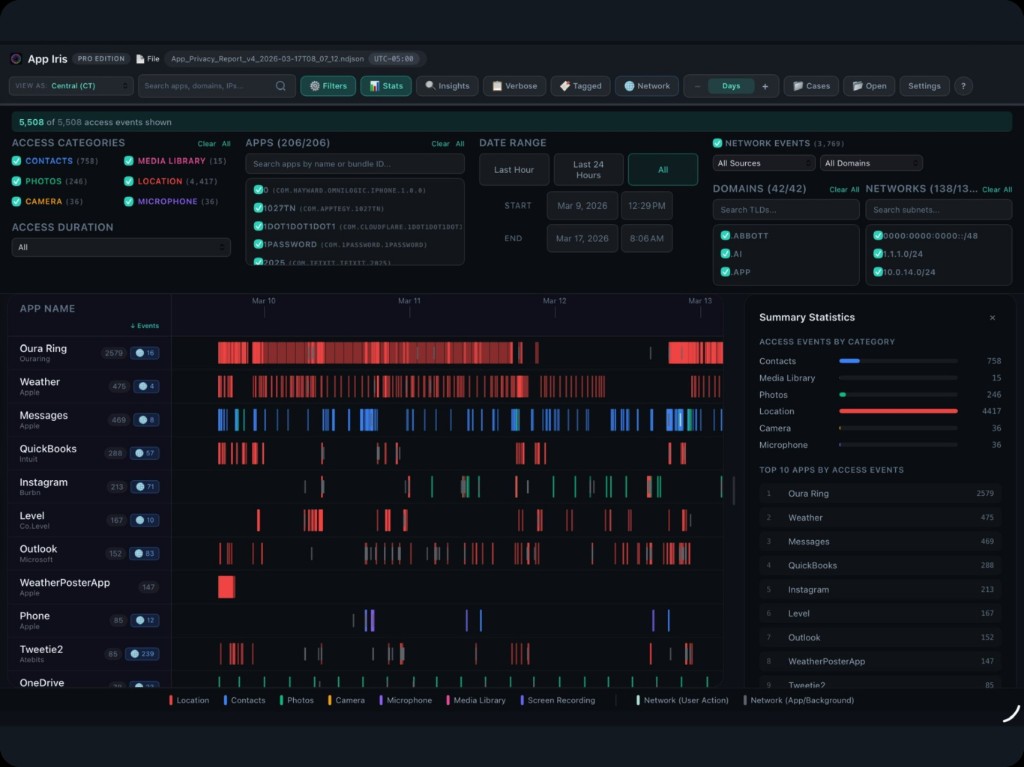
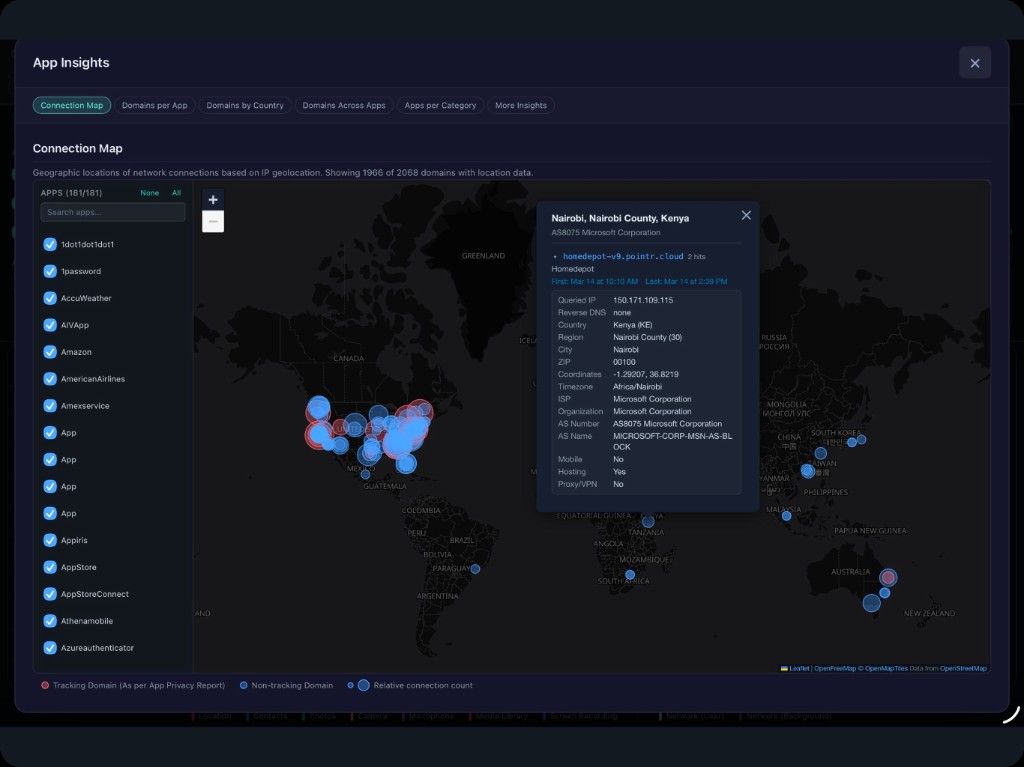
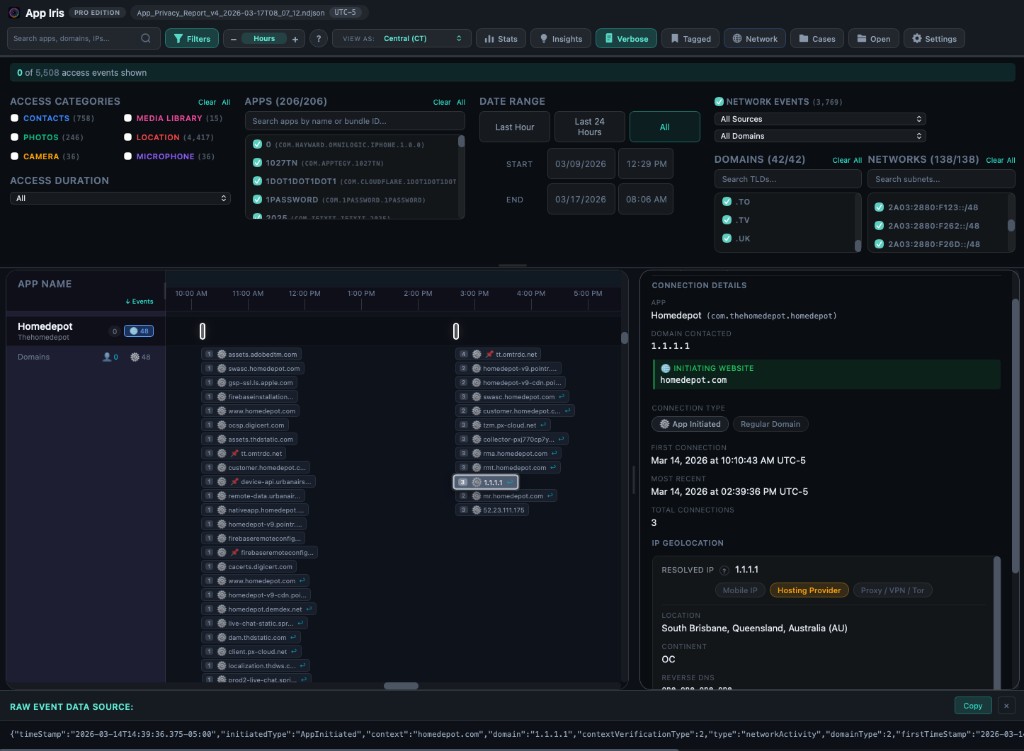
While App Iris is powerful for analysts and technical users, it's also designed to be accessible for everyone.
Available Now
We're excited for you to try it! We've launched App Iris with a tiered model, with a free version plus two upgrade options. The base version leverages free but limited enrichment APIs, while we incur costs for the Personal and Pro versions which use a commercial API.
- Basic — Free to download and use. Explore the most recent 24 hours of any report. Geolocation enrichment uses HTTP and must be triggered manually per-event due to free API limits.
- Personal — Unlocks full report history, automatic geolocation (HTTPS), and Insights reporting (including global connection maps, .CSV export, and more).
- Pro — Adds case management, multi-report aggregation for extended timelines, event tagging with SQLite case storage suitable for offline analysis, additional configuration features, and more.
Privacy is also important to us—your report data stays on your device (or wherever you choose to save it). The only exception is for geolocation, where individual domains and IPs are sent to a third party provider API for lookups. We have no access to your lookup data.
In the weeks ahead, we'll dive a bit deeper into the technical origins of the app privacy data, its scope and limitations (for instance, it is not completely immutable like an audit log), and share some of the more interesting findings we've already uncovered during testing.
We'd love to hear how App Iris has helped your investigations, and welcome your feedback or ideas for further improvements. In the meantime, we have some additional features already in the works! Email us at appiris@auxiris.com.