 Available on macOS®, iPhone® & iPad®
See What Your Apps Are Really Doing
App Iris transforms the raw data buried in Apple's® iOS App Privacy Reports into a refreshingly simple, yet powerful interactive timeline of key iPhone and iPad activity.
Uncover answers to questions that once required costly and time-consuming mobile forensic tools and specialist expertise. Easily answer the “who, what, and when” your device's installed apps were accessing privacy-sensitive features, or communicating with outside networks and systems around the world.


Privacy Analysis • Connection Tracking • Activity Investigation
See App Iris in Action
Why This Matters
Apps regularly access sensitive device resources like location, camera, microphone, contacts, and photos. They also connect to advertising, content, analytics, and data networks around the world, sometimes while your phone is locked or idle.
Apple's native App Privacy Report viewer displays some of this activity data, but it does not expose the full details, nor is it searchable.
App Iris turns that raw report into a searchable, visual timeline so you can fully understand what happened, when it happened, how long it happened, and which apps and domains were involved.
Sensitive Access
Review app access to location, camera, microphone, contacts, photos, and other protected resources.
Network Activity
See domains, trackers, infrastructure, and geographic connections hidden inside raw report data.
Investigation Context
Use timeline, filtering, and correlation views to move from raw events to useful answers.
Answers, Not Charts
Existing privacy tools simply provide summaries, charts, and graphs of this data. App Iris is built by investigators—providing an enriched, timeline-oriented view of the data found in the App Privacy Report, moving from charts to actual answers.
Interactive Timeline
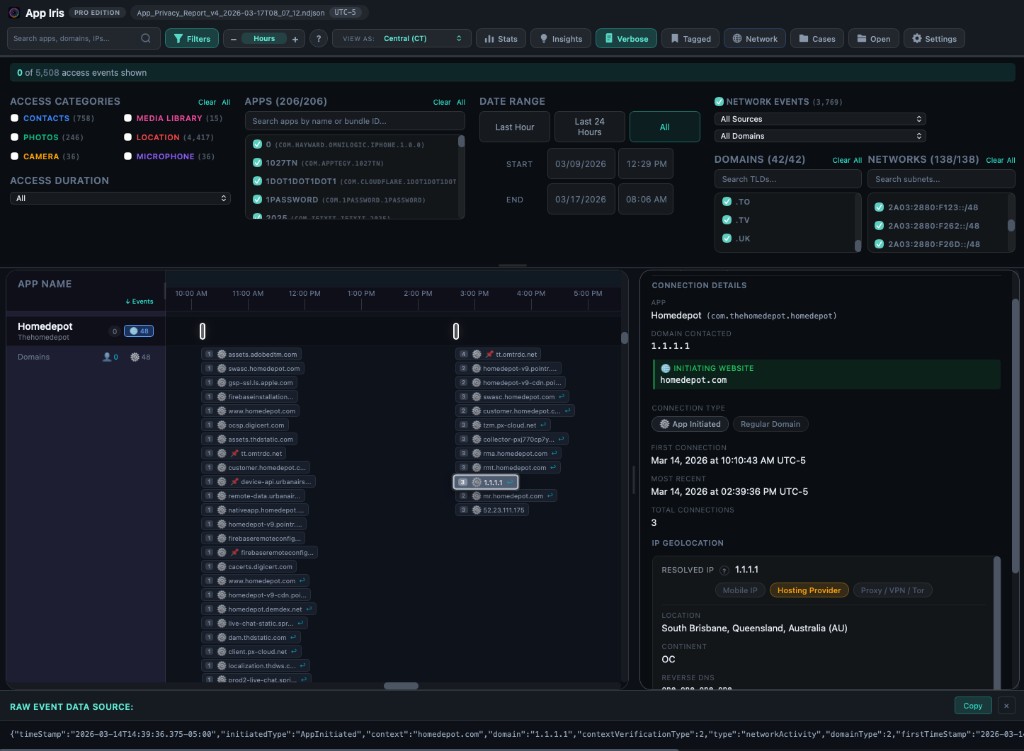
See every recorded network and device access event depicted on an intuitive, visual timeline, with metadata and configurable time zone offsets. Zoom in to see short sequences of activity. Identify correlations and patterns among app connections and usage.
Network Connection Tracking
Discover which domains your apps connect to, who owns those domains, and whether they’re flagged as potential trackers. Use Geo-IP lookups to reveal the physical location of servers your apps have communicated with. Explore connections on an interactive world map.
Event Correlation
Click any event to instantly see what else was happening around the same time. Identify interesting activity patterns — like an app accessing your camera or photos while browsing a social media site.
Powerful Filtering & Search
Toggle access categories on and off. Filter by app, date range, or access duration. Search and filter activity across app names, bundle IDs, domain TLDs and subnets. Isolate exactly the activity you’re looking for.
Insights & Analytics
See which apps contact the most domains. Identify tracking domains shared across multiple apps. View resource access breakdowns by category with sortable tables and expandable details.
Investigation-Ready Export
The Pro edition enables tagging and annotation of interesting events, and CSV export. Create and manage multiple device investigations with case database management. Import multiple report files to analyze beyond Apple’s 7-day window.
Built for Anyone in Need of Insight
Privacy-Conscious Individuals
Understand what your apps are really doing behind the scenes. See which apps access your location at 3 AM and which domains they’re quietly communicating with.
Security Analysts & Investigators
Conduct structured investigations with case management, event tagging, and CSV export. Build extended timelines from successive reports and document findings with annotations.
IT & Compliance Teams
Audit device app privacy behavior for policy compliance. Identify apps that access resources outside their stated purpose. Tag and export interesting events.
Parents & Guardians
Monitor which apps on a child’s device are accessing the camera, microphone, or location. Identify apps with excessive tracking behavior.
Your Data Stays On Your Device
App Iris is built on a simple privacy principle: your data is yours. Every report is processed and stored locally on your device. There are no accounts to create and no finicky tools to set up. If you enable geolocation features, we send only individual domain names (or IP addresses, as applicable) from the report data to a third party geolocation API. See our App Iris Privacy Policy for more details.
Frequently Asked Questions
What is an App Privacy Report?
App Privacy Report is a feature Apple introduced in iOS 15.2 that records which apps access sensitive device resources (camera, microphone, location, contacts, photos, media library, screen recording) and what network domains they connect to. The report covers a rolling 7-day window.
How do I get my App Privacy Report?
On your iPhone or iPad, go to Settings › Privacy & Security › App Privacy Report. If it’s not already enabled, turn it on and wait a few days for data to accumulate. Then tap "Save App Privacy Report" to export an NDJSON file, or share it directly to App Iris on your iOS device.
Does App Iris work with iPad® reports?
Yes. App Privacy Reports from any iOS v15.2+ device can be analyzed in App Iris.
Is my data sent anywhere?
All reports are processed and stored locally on your device. The only external connection is for domain Geo-IP lookups, which sends domain names and IP addresses from a report to a third party provider to provide information such as domain ownership, country, and approximate location. This feature can be disabled in settings.
Why can I only see 24 hours on the Basic tier?
The free Basic tier lets you explore the most recent 24-hour window of any report so you can evaluate the app before subscribing. Personal and Pro tiers unlock full report analysis with no time restrictions.
Can I analyze more than 7 days of data?
Yes. Apple’s report covers a rolling 7-day window, but with Pro you can import and store multiple report exports over time. Pro’s case management automatically merges overlapping data to build extended timelines.
What’s the difference between Personal and Pro?
Personal is ideal for individual users who want to analyze reports from their own device(s). Pro adds light case management, multi-report deduplication and aggregation, event tagging, annotations, and CSV export — features designed for security analysts and investigators conducting reviews of multiple devices.
Are there limitations in the App Privacy Data?
There are some known limitations to be mindful of. For instance, deleting an app removes its history from future privacy reports. Domains contacted while using private browsing are not captured in the report. And only the first, last and total count of network connections to a specific domain or address are saved.
Can my App Privacy Reports be saved and processed automatically?
Apple does not allow for automatic export of App Privacy Reports. However, App Iris simplifies the process by including an optional home screen shortcut that takes you directly to the export feature with one tap, and reports can be directly shared to App Iris. The shortcut can be scheduled to prompt you on a daily or weekly basis, if desired. If you use App Iris on a Mac or iPad, and the source iOS device is nearby -- you can also transmit the report wirelessly between devices using AirDrop®, or store in an iCloud® Drive folder accessible to both devices.
Take Control of Your App Privacy
Download App Iris and see what your apps are really doing — for free.